MyMountSinai
- 4.5
- Rating
- 100.00K
- Installs
- Free
- Price

 Analysis by App-foxy
Choosing a health app is less about collecting another icon on your phone and more about deciding where you want everyday medical tasks to live. MyMountSinai is designed for people who use Mount Sinai Health System and want one digital starting point for that relationship. I found its strongest appeal in that focused approach: instead of trying to be a general wellness tracker, it brings the Mount Sinai experience into a single mobile app.
This is a free medical app from Mount Sinai Health System, available to Everyone and compatible with operating systems from version 11 onward. It was released on August 4, 2021, and the current version is 11.8.3. Those details matter because this is not a casual symptom-search tool; it is intended for people who already interact with a particular healthcare system and want a more convenient way to manage that connection.
What I looked for before recommending it
When I evaluate an app like this, I start with a simple question: does it reduce the number of steps between a patient and the care they are already trying to use? A medical app can look polished and still be frustrating if it makes scheduling unclear, separates important information across too many screens, or becomes useful only during an appointment. MyMountSinai makes more sense when judged as a patient-access companion rather than as a replacement for a doctor, emergency service, or independent health journal.
You May Also Like

 Blood Strike: 2.5 Anniversary
Blood Strike’s Loadouts Turn Every Drop Into a Tactical Gamble
A close look at Blood Strike’s custom loadouts: how fast access to signature weapons reshapes its battle royale rhythm, rewards preparation, and narrows the gap between fights.

 Pandora - Music & Podcasts
Pandora’s Music Is Easy to Start, but Harder to Recover
Pandora’s strength is its low-effort path from a seed to a station. Its weak spot is how much confidence it asks you to place in connection, setup, and quiet recovery.

 8 Ball Pool
 Is Built on Rivalries, Rematches, and Routine
A close look at the rivalries, rematches, shared routines, and unanswered safety questions that turn a quick pool match into a persistent mobile community.

 Samsung Music
’s Quiet Strength Is Playing What You Already Own
Its reach comes less from spectacle than from dependable access to a personal library. That simplicity is both the app’s strongest retention engine and its ceiling.

 AccuWeather: Weather Radar
AccuWeather Review: A Quick, Clear Forecast for Everyday Decisions
For everyday plans, the best forecast is the one you can understand quickly. AccuWeather makes rain timing, radar, and local conditions easy to act on, with a few trade-offs.

 Hill Climb Racing
Why Hill Climb Racing Still Turns Crashes Into One More Run
A tiny car, a bumpy hill and one more upgrade: Hill Climb Racing keeps resurfacing because its simple chaos makes every near-miss feel personal.
More From Our News Desk



I also consider whether the app fits a person’s existing care routine. If your appointments, providers, and records are connected to Mount Sinai, a dedicated app can be more practical than juggling a browser, phone calls, email messages, and unrelated health tools. If you mainly want exercise tracking, medication reminders, nutrition guidance, or general symptom education, a different category of app may serve you better.
The public response gives the app a 4.6 average from around 3.1 thousand ratings, with roughly 1.3 thousand written reviews. It has passed 100 thousand installs, which suggests that it is being used beyond a tiny pilot audience. I would not treat those figures as proof that every workflow is smooth, but they do indicate a meaningful user base and a generally positive reception.
A useful first step: decide what problem you are solving
Before installing it, I would write down the task that currently annoys you most. Is it finding appointment information? Keeping track of communication with your care team? Reaching the right part of a large health system without repeatedly searching the web? The answer changes how valuable the app feels. A focused patient portal can be excellent for one of these jobs and unnecessary for another.
For example, imagine that I have an appointment next week and cannot remember the exact time, location, or preparation instructions. The value of MyMountSinai is not that it gives me a new way to think about health; it is that I can begin with the same system connected to that appointment instead of searching through old messages. After the visit, I can return to the app for the next part of the care process rather than starting from scratch.
That continuity is the central decision criterion. I would choose it because I want a direct digital doorway into Mount Sinai services. I would skip it if I am looking for a universal health dashboard that combines information from many unrelated providers or devices.
Why the single-system approach can be convenient
The app’s biggest strength is its identity. MyMountSinai is not trying to be everything for everyone; it is built around Mount Sinai Health System. That narrow scope can make a complicated healthcare relationship easier to organize. When a person has several appointments, different clinicians, and follow-up tasks, having one recognizable place to begin may be less mentally expensive than remembering which website or phone number applies to each situation.
I also like the idea of using one app as a preparation tool before an appointment. I can make a short list of questions, review what I need to discuss, and open the app when I am ready to handle a care-related task. This is a small habit, but it prevents the common problem of remembering an important question only after leaving the clinic.
Another non-obvious advantage is that a dedicated patient app can help separate medical administration from general phone clutter. Health-related messages often compete with shopping notifications, social conversations, and work email. Keeping the Mount Sinai relationship in a clearly labeled place gives it a better chance of being noticed when I am deliberately handling healthcare rather than casually scrolling.
How I would use it during an ordinary week
On a normal week, I would treat MyMountSinai as a task hub rather than an app I open for entertainment. At the beginning of the week, I would check upcoming care-related obligations and note anything I need to ask. Before an appointment, I would use the app as my starting point for confirming the details available there. Afterward, I would return to it instead of relying on memory or scattered notes.
For a family member helping an older relative, the value may be less about speed and more about reducing confusion. A helper can establish a routine around checking the same healthcare channel, preparing questions, and following up after visits. That does not remove the need to understand account access or consent arrangements, but it can make the overall process feel more structured than switching between unrelated tools.
I would also keep a backup habit: save essential appointment details in a personal calendar and write down urgent contact instructions somewhere accessible. A health app is useful, but it should not be the only place where a time-sensitive plan exists. This is especially important when a person is stressed, traveling, or dealing with a weak connection.
Where the app is likely to win
MyMountSinai wins when the user is already part of the Mount Sinai ecosystem and wants convenience without building a personal system from several disconnected services. The developer is the health system itself, so the app’s purpose is immediately clear. I do not have to guess whether it is meant for general wellness, fitness coaching, or medical access; its value comes from bringing Mount Sinai-related activity into one spot.
It can also be a better fit than a browser shortcut for people who regularly handle healthcare from a phone. An app gives me a dedicated place to return to, and that matters when I am in a waiting room, preparing for a visit, or trying to remember what I intended to ask. Even when the underlying service is similar to a website, the lower friction of a familiar app can make me more likely to use it.
Another strength is clarity of purpose. Many health apps mix education, advertisements, wellness challenges, device data, and provider services. MyMountSinai has a more practical role. If my priority is interacting with Mount Sinai rather than monitoring every aspect of my lifestyle, the narrower design is an advantage rather than a limitation.
Important trade-offs before you switch to it
The same focus that makes the app useful can make it unsuitable for people outside the Mount Sinai system. If your care is spread across several hospitals and independent practices, MyMountSinai may become only one piece of your digital routine. In that situation, a broader health-record organizer or the separate portals used by your other providers may be more convenient overall, even if they are less focused.
I would also avoid treating it as a medical decision-maker. A patient-access app can help organize contact with care, but it should not replace emergency services, professional advice, or a direct conversation with a clinician when symptoms are serious. The right workflow is to use the app for appropriate administrative and communication tasks while keeping urgent decisions in the hands of qualified medical professionals.
There is also a human limitation: no app can make healthcare feel simple when the underlying situation is complicated. A person dealing with referrals, multiple specialists, insurance questions, or changing treatment plans may still need phone support. MyMountSinai can be the first place I look, but I would not assume that every difficult issue can be solved without speaking to someone.
My comparison with the usual alternatives
The closest alternative is often a mobile browser pointed at a healthcare website. A browser can be perfectly adequate for occasional use and may suit someone who dislikes installing apps. I prefer the dedicated app when I expect to return regularly, because a recognizable icon and a focused environment remove some of the searching involved in getting started. The browser remains a reasonable choice for infrequent tasks or for people who want to keep medical services out of their app collection.
A second alternative is a general health platform that combines information from multiple providers, devices, or wellness services. That kind of tool is better when my main goal is to see a broad personal health picture in one place. MyMountSinai is better when the priority is the Mount Sinai relationship itself. These are not direct substitutes in every situation: one emphasizes breadth, while the other emphasizes a specific care network.
There are also standalone wellness apps for exercise, food, sleep, mood, or symptom notes. Those can be more engaging for daily self-monitoring, but they do not replace a provider-focused app. I would use one of them alongside MyMountSinai if I wanted lifestyle tracking, not instead of it. Choosing between the two categories depends on whether my immediate need is managing care or observing personal habits.
The real cost of changing your routine
Because MyMountSinai is free, the main cost of switching is not a subscription. It is the time needed to make a new routine feel natural. I would expect the first use to involve signing in, understanding where common tasks are located, and deciding which information I still want in my calendar or notes. That initial effort is worthwhile only if I have a continuing connection to Mount Sinai.
For someone already using Mount Sinai services through a browser or phone calls, the transition should be judged by repetition. If I handle appointments or care communication often, a dedicated app can repay the setup effort quickly. If I interact with the system only once in a long while, the convenience may be too small to justify changing habits.
My practical advice is to install it before a non-urgent task, not during a stressful medical moment. I would sign in, look around, and make sure I understand my preferred route to the information I use most. I would also keep my device updated enough to meet the app’s minimum operating-system requirement, which is version 11. That preparation makes the first genuinely important use less rushed.
Small habits that make it more useful
First, I would prepare questions before opening the app. A patient portal is much more valuable when it supports a clear purpose, and a short list prevents me from forgetting concerns during a busy appointment. Second, I would use a separate calendar for dates and times I cannot afford to overlook. The app can remain the healthcare reference point, while the calendar provides a quick reminder.
Third, I would review my routine after every appointment. Did I find what I needed quickly? Did I still have to call for a particular issue? That reflection tells me whether the app is genuinely reducing effort or merely adding another place to check. This is a better test than judging it after one installation session.
Finally, I would keep expectations realistic when helping another person. Showing someone where to begin is different from taking control of their medical information. Respecting the patient’s privacy and following the appropriate account arrangements matters more than making the workflow fast.
Who should install it, and who should skip it?
I recommend MyMountSinai to patients who receive care through Mount Sinai Health System and want a dedicated mobile route into that experience. It is especially suitable for people who manage several care-related tasks from a phone, prefer a single starting point, or find browser-based healthcare routines easy to lose among everyday tabs and messages.
I would also consider it for a family caregiver who regularly helps coordinate a relative’s healthcare, provided the account and access arrangements are handled appropriately. The app’s greatest benefit in that setting is organization: one familiar destination can make preparation and follow-up less scattered.
I would skip it if I am looking for a general fitness app, a universal medical record for many unrelated providers, or an emergency symptom service. I would also hesitate if my interaction with Mount Sinai is extremely rare and a browser is already effortless for me. In those cases, the app may not solve a problem large enough to justify another routine.
After using it as a focused medical companion, my opinion is positive but specific: MyMountSinai is most valuable when your healthcare relationship is already centered on Mount Sinai. Its free access, Everyone age rating, and established presence make it easy to consider, while the current 11.8.3 release shows that it remains an actively maintained part of that digital experience.
I would recommend installing it ahead of your next ordinary care task, exploring it without pressure, and keeping a backup calendar habit for important dates. If it brings your Mount Sinai tasks into a clearer routine, it earns a permanent place on your phone. If you need one tool to combine every provider and every wellness goal, choose a broader alternative instead. For the right user, though, MyMountSinai does something genuinely useful: it gives a Mount Sinai patient one consistent place to begin.
FAQs for MyMountSinai
01What is MyMountSinai, and what can I use it for?
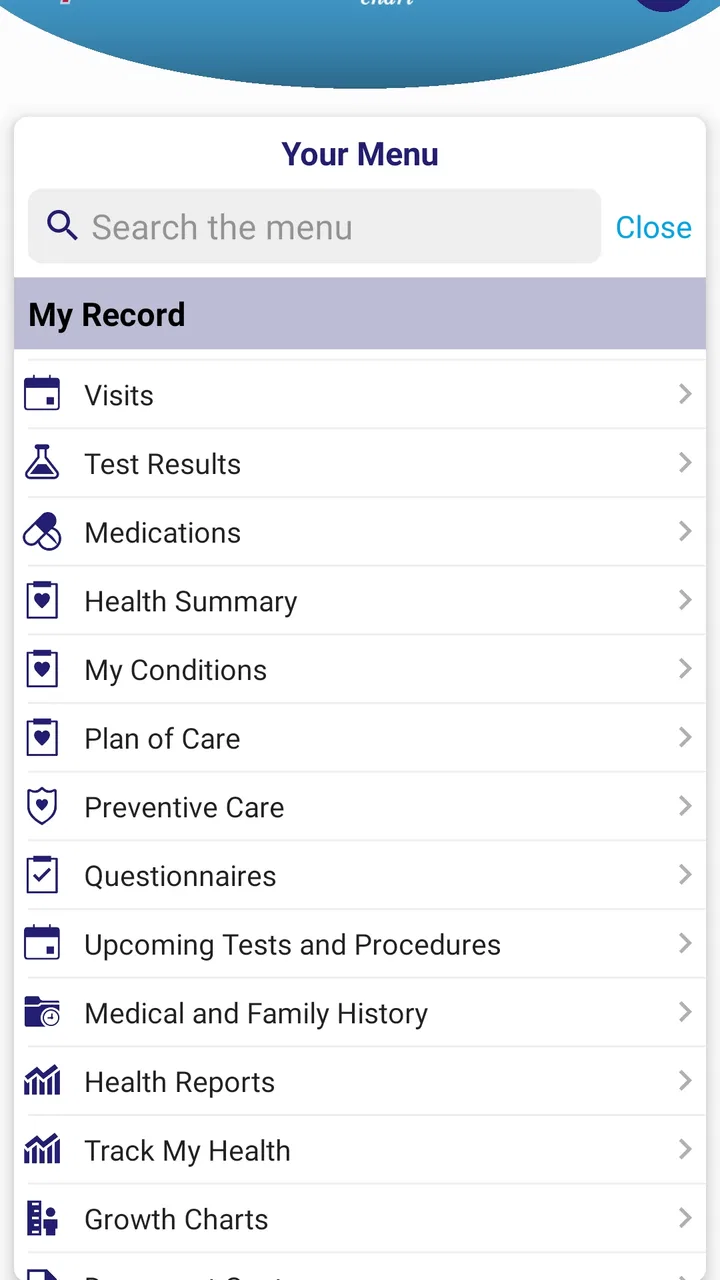
MyMountSinai is the official patient portal app for Mount Sinai patients. After signing in, you can typically view portions of your medical record, review test results, manage appointments, request prescription refills, communicate securely with your care team, and access billing or insurance information. Available features may vary depending on your location, provider, and the type of care you receive.
02How do I create an account or sign in to MyMountSinai?
To use MyMountSinai, you generally need an existing Mount Sinai patient account or an activation code provided by the health system. The app may ask you to verify personal information and create login credentials. If you already use the web version of the patient portal, you can usually sign in with the same details. Contact Mount Sinai support if you cannot activate or access your account.
03Can I schedule appointments and communicate with my doctor through the app?
MyMountSinai may allow eligible patients to request, schedule, or manage appointments, although the exact options depend on the department and provider. You can also use secure messaging to ask non-urgent questions, discuss follow-up care, or send information to your healthcare team. Messages are not intended for emergencies, and response times can vary, so urgent symptoms require immediate medical attention.
04Does MyMountSinai provide access to test results, prescriptions, and medical records?
The app is designed to give patients convenient access to many parts of their Mount Sinai health information, including laboratory results, visit summaries, medications, allergies, immunizations, and selected clinical documents. Some results may appear only after they are reviewed or released according to Mount Sinai policies. Prescription refill requests and medication details may also be available, but not every medication or record is guaranteed to appear.
05Is MyMountSinai free, and is my personal health information secure?
MyMountSinai is generally available at no additional charge to eligible Mount Sinai patients, although normal mobile data or internet charges may apply. The app uses account authentication and security measures intended to protect personal health information. For your safety, install it from an official app store, use a strong password, enable device security, and avoid accessing your account on shared or public devices.
Pros
- Secure access to appointments
- test results
- and medical records in one place.
- Prescription refill requests can save time compared with calling the clinic.
- Supports video visits for convenient remote consultations with participating providers.
- Health reminders and notifications help users keep track of upcoming care.
- Useful for managing care across multiple Mount Sinai hospitals and clinics.
Cons
- Some features may only work for current Mount Sinai patients with an account.
- Video visits depend on provider availability
- device support
- and a stable connection.
- Users may need to verify their identity before accessing sensitive health information.
- Notifications can become easy to miss if several care-related alerts are enabled.
- The app is less useful for people receiving care outside the Mount Sinai network.

MyMountSinai
Gallery